What Is Jenny Mod Gameplay Like?
Unlike standard Minecraft, where villagers mainly trade and mobs follow fixed behavior, Jenny Mod focuses on a custom non-player character (NPC). Some builds offer dialogue, item reactions, scripted movement, and interaction menus. Other builds provide a simpler character model or animation pack. Jenny Mod does not turn Minecraft into a separate standalone game; mining, crafting, building, and survival remain part of the same Minecraft world.
How Do You Play Jenny Mod in Minecraft?
Start in a fresh Creative world so you can find custom items and try NPC actions without changing your main survival save.
How to Start Jenny Mod Gameplay on Java Edition
- Open Minecraft using the Forge profile that matches your Jenny Mod .jar. The widely documented older Java setup uses Minecraft 1.12.2 and Forge 1.12.2.
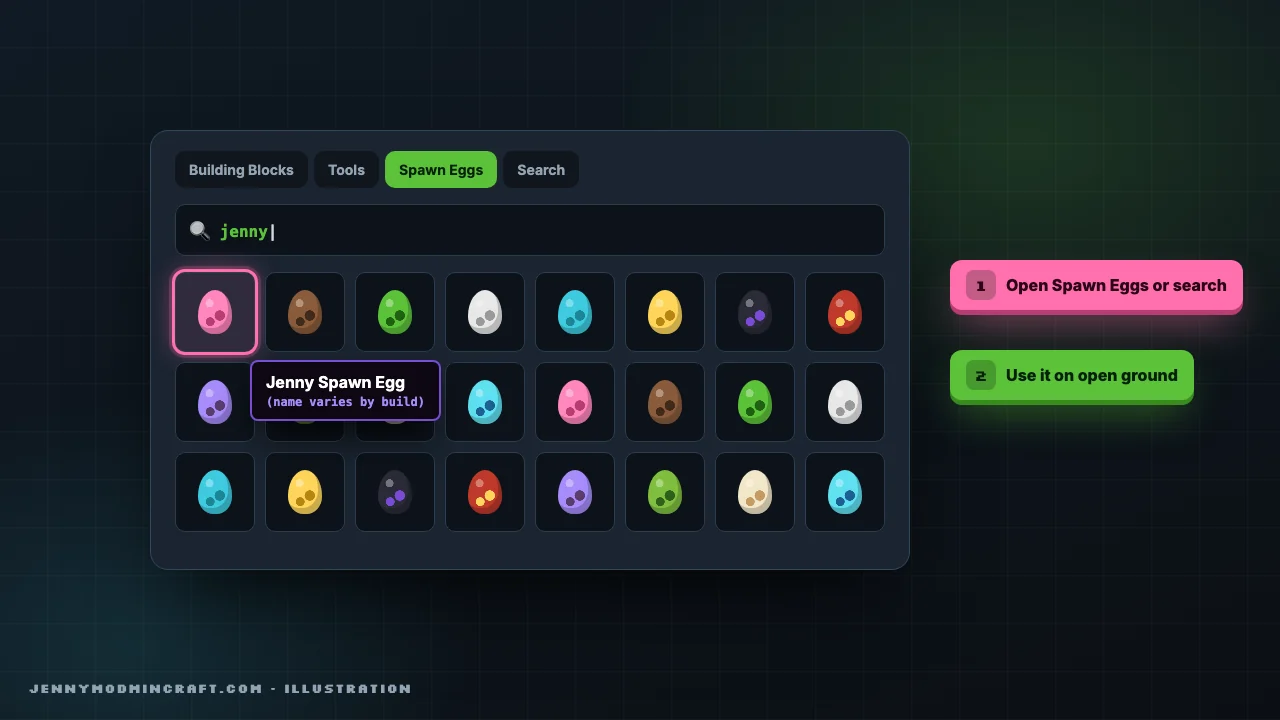
- Enter a new Creative world. Open the inventory and check for a Jenny-related spawn egg, item, or mod tab. Names and placement vary by build.
- If your build provides a spawn egg, select it and use it on a clear, level area. Some guides describe a character structure instead; do not assume every package generates one.
- Approach the NPC and try the standard Java Use/Interact control, usually right-click. If nothing happens, try with an empty hand, then with an item named in your build's instructions.
- Read the on-screen choices before selecting one. Test dialogue, item responses, or companion actions only when they appear in your version.
- Save your test world after confirming the character loads and responds. Then decide whether to use the mod in a regular survival world.
How to Start Jenny Mod Gameplay on Bedrock or MCPE
- Open a test world where your Jenny-related add-on is already active. Bedrock uses .mcpack and .mcaddon packages rather than a Java .jar.
- Check the Creative inventory for any added spawn item or character entry. A texture-only pack may change appearances without adding an interactive NPC.
- Spawn the character if the pack provides that option. On mobile, use the normal touch interaction shown by Minecraft; on Windows Bedrock, use the mapped Use control.
- Look for an interaction button, menu, or visible response. Bedrock ports may have fewer actions than Java builds and may use different menus.
- If the character appears without animations or interactions, check whether the add-on requires a matching behavior pack and whether it is enabled in your world.

How Do Jenny Mod Controls Work?
There is no confirmed universal Jenny Mod keybind list that applies to every Java and Bedrock release. Minecraft's standard controls are a starting point, but custom actions must be checked in your installed build.
Java Edition: Move with WASD, look around with the mouse, and normally right-click to use or interact. Open Options > Controls to check whether the mod registered extra keybinds. If a custom menu appears, use the choices shown there.
Bedrock on PC: Use your normal Minecraft movement and interaction keys. Look in Settings > Keyboard & Mouse if you changed the defaults. A community add-on may use the game's standard interaction prompt instead of a dedicated menu.
Bedrock on mobile: Move with the touch controls and use the on-screen action prompt or tap interaction provided by your Minecraft settings and the add-on. Do not assume that long-pressing always activates the same action.
Why Doesn't Right-Click or Tap Open an Interaction?
First, check that the entity comes from an active add-on rather than a decorative skin or texture. Try interacting with an empty hand, then check whether the package calls for a particular item. If other mods are active, test this one alone in a fresh world.
What Features Does Jenny Mod Add to Minecraft?
The core attraction is a custom NPC and its animations. Extra dialogue, items, and companion actions depend on the release, so check the controls and menu in your installed version.
Custom NPC Characters
The main feature is a character with a model and behavior different from ordinary Minecraft villagers. Depending on the release, the NPC may appear through a spawn item, a custom structure, or another method described by its creator.
Dialogue and Interaction Menus
Some Java builds show dialogue or action choices when you interact with the NPC. A menu may include talking, item reactions, or other scripted actions. If no menu appears, it may be a different build rather than a hidden setting you need to unlock.
Gifts and Item Reactions
Diamonds, emeralds, and gold ingots are often mentioned in community gameplay guides as items that can trigger responses. However, there is no reliable item-to-reaction chart for all Jenny Mod packages. Test only items supported by your release, and do not assume gifts always unlock a relationship level or new animation.
Companion Actions
Some descriptions list actions such as Follow, Stay, or Guard. These options are build-dependent. If your menu does not show one of them, the action may not exist in that release. Avoid installing unrelated add-ons just because a video shows a command you cannot find.
Animations and Sounds
Custom idle poses, walking movements, reactions, and scripted animation sequences are a major reason players search for Jenny Mod gameplay. The available animations, sound effects, and triggers depend on the model and animation files in your package. A texture pack alone does not prove that the full animation system is included.
Jenny Mod Gameplay: Java vs Bedrock at a Glance
Java / Forge: .jar file; mouse and keyboard controls; custom mod menus may be available; requires a compatible Java and Forge build.
Bedrock / MCPE: .mcpack or .mcaddon; touch controls on mobile or standard Bedrock controls on PC; interactions depend on the behavior pack and resource pack.
Both: Test the character spawn, interaction prompt, and animations in a new world. Do not assume that a feature shown in a Java video exists in a Bedrock add-on.
Do Jenny Mod Features Differ Between Java and Bedrock?
Yes. The older Java mod runs through a Forge-compatible .jar, while Bedrock and MCPE versions are community add-ons that use pack files. The two platforms do not share the same mod loader, interface, or guaranteed feature set.
Java / Forge: Can use custom Java mod code and may expose extra menus, entities, and animation behavior. Exact features depend on the .jar and Minecraft version.
Bedrock / MCPE: Uses behavior and resource packs. A package may provide a character, texture changes, and basic interactions, but Java-only mechanics do not automatically carry over.
Do not judge a Bedrock download by a Java gameplay video. Check screenshots and release details for the same package you plan to play.
Can You Play Jenny Mod in Multiplayer?
Multiplayer support is not guaranteed. A Java mod that adds custom entities or behavior may need compatible server-side installation and matching versions on players' clients. A client-only model or cosmetic change behaves differently. Bedrock worlds and servers must support the specific add-on and its required packs. Before inviting others, test the mod in a private world, check whether the server permits the required files, and make sure everyone understands the mod's mature-content theme. Do not assume a single-player package works on Minecraft Realms or a public server.
How Can You View Jenny Mod Gameplay Images and GIFs?
Screenshots are most useful when they show something a player can recognize in-game: the spawn item, the NPC in a world, an interaction menu, and a comparison between Java and Bedrock. Short, non-explicit GIFs can show movement or an animation trigger more clearly than a still image.


For a useful gameplay gallery, pair each image or GIF with the exact package name, Minecraft edition, and what is happening on screen. Avoid using unrelated Minecraft renders as proof of a feature. Only use images or clips from a known build. A screenshot of the spawn item, the NPC, and the interaction menu can help readers identify the same features in their game.
How Can You Tell Which Gameplay Features Your Build Includes?
Start with the downloaded file's release notes, then launch a clean test world and check for a spawn item or NPC. Record which interaction options actually appear. If a guide claims that the mod has combat, inventory storage, teleportation, romance levels, or special commands, treat that claim as specific to the demonstrated build until you can reproduce it.
A simple test is more useful than a long feature list:
Those checks tell you what your installation really supports.
Jenny Mod Gameplay FAQs
How do I use Jenny Mod after installing it?
Open a world with the mod active, find the NPC or its spawn item, and use your normal Minecraft interaction control. Look for on-screen choices. The exact process depends on your Java or Bedrock package.
Does Jenny Mod have a separate game mode?
Not generally. Jenny Mod is a modification or add-on used inside Minecraft. You still play in a Minecraft world, usually in Creative or Survival mode.
Can Jenny follow the player?
Some community builds describe a Follow action, but it is not confirmed for every release. Check the menu or documentation for your installed package.
Why do Jenny Mod animations look different in videos?
Videos may use different mod versions, models, resource packs, or Minecraft editions. Some clips are edited or use other add-ons. Compare footage only when the file and game version are identified.
Can I use Jenny Mod with other Minecraft mods?
Possibly, but compatibility varies. Test Jenny Mod alone first, then add other mods one at a time. Keep a backup of your world before changing the mod list.
Is Jenny Mod gameplay the same on Android and PC?
No. Java PC mods and Bedrock mobile add-ons use different systems. Controls and supported interactions can differ even when the characters look similar.
What Should You Do Next?
If the NPC appears and responds, try each available action in a fresh world before using the mod in a saved survival world. Keep a backup of your world before changing mod files or adding other packages.